Overview
Developer Notes (DevNotes) are written using MyST markdown, a flavor of markdown designed specifically for technical communication. The complete MyST markdown documentation can be found here.
The purpose of this document is to share some common MyST syntax patterns that we’ve found useful when writing DevNotes and gather them in one place. This document was prepared by looking at examples of previous DevNotes. We recommend exploring the markdown files of existing DevNotes to see these syntax patterns used in practice. See here for how to explore a DevNote.
Basic syntax
Typography
MyST markdown make use of standard markdown typography for things like section headers, italicization, lists, and so on. See the MyST docs here for more information.
Figures
Figures are the building blocks of nearly any DevNote. They can be constructed using “colon fence” syntax. This type of syntax is very common in MyST markdown. Options to modify the behavior of the figure are included inside the colon fence. For example:
# Colon fence syntax

:::{figure} [link-to-figure]
:option-1: parameter-1
:option-2: parameter-2
:option-3: parameter-3

My caption goes here...
:::
Some useful options include:
:label:- allows you to reference this figure elsewhere in your document.:align:- allows you toleft,right, orcenterjustify your figure.:width:- allows you to scale the size of your image.
Let’s take a look at some real examples. Here, I can create a link to my figure by 1) specifying a path to particular file in my project or 2) specifying a URL link to an image elsewhere on the web.
:::{figure} ./figures/path-to-my-figure.png
:label: fig:my-fig-1
:align: center
:width: 50%

Illustration of the PPK2 based energy regeneration the PURE system.
:::
Will appear as...
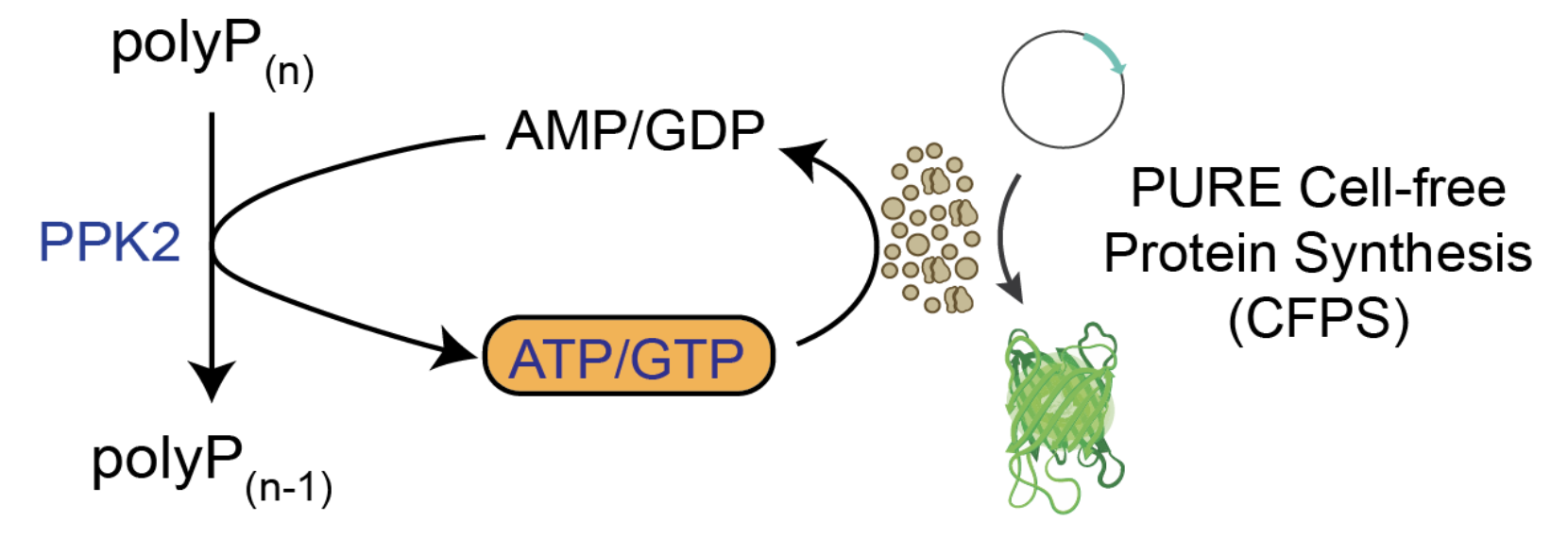
Illustration of the PPK2 based energy regeneration the PURE system.
:::{figure} https://github.com/bnext-bio/nucleus-developer-notes/blob/main/dev-notes/04_ppk/figures/PPK-illustration.png
:label: fig:my-fig-2
:align: left

Illustration of the PPK2 based energy regeneration the PURE system.
:::
Will appear as...
Illustration of the PPK2 based energy regeneration the PURE system.
Tables
Tables follow the same basic patterns as figures:
This is my figure caption
| Header 1 | Header 2 | Header 3 |
|---|---|---|
| entry 1 | entry 2 | entry 3 |
| entry 4 | entry 5 | entry 6 |
| entry 7 | entry 8 | entry 9 |
In general, generating tables in markdown is somewhat clumsy. We often generate tables in other applications like Notion and they can be copied and pasted directly into your DevNote file and will be properly formatted. It’s worth noting that tables can embedded directly in your document without placing it within a colon fence. Let’s look at some specific example:
:::{table} This is my table caption


| Condition | Description |
| --- | --- |
| No Folinic Acid  | Energy mix made without folinic acid. |
| Folinic  | Folinic acid dissolved in water, added to energy mix. |
| Folinic + MTHFS  | Folinic acid dissolved in water, added to energy mix + 0.07 µg/uL MTHFS supplemented to PURE reaction.  |
| 5,10-methenyl-THF | Folinic acid pre-converted using Shimizu’s method. |
| Positive Control | Standard NEB PURExpress reaction. |
| Negative Control | NEB PURExpress without input DNA. |
:::
Will appear as...
This is my table caption
| Condition | Description |
|---|---|
| No Folinic Acid | Energy mix made without folinic acid. |
| Folinic | Folinic acid dissolved in water, added to energy mix. |
| Folinic + MTHFS | Folinic acid dissolved in water, added to energy mix + 0.07 µg/uL MTHFS supplemented to PURE reaction. |
| 5,10-methenyl-THF | Folinic acid pre-converted using Shimizu’s method. |
| Positive Control | Standard NEB PURExpress reaction. |
| Negative Control | NEB PURExpress without input DNA. |
| Condition | Description |
| --- | --- |
| No Folinic Acid  | Energy mix made without folinic acid. |
| Folinic  | Folinic acid dissolved in water, added to energy mix. |
| Folinic + MTHFS  | Folinic acid dissolved in water, added to energy mix + 0.07 µg/uL MTHFS supplemented to PURE reaction.  |
| 5,10-methenyl-THF | Folinic acid pre-converted using Shimizu’s method. |
| Positive Control | Standard NEB PURExpress reaction. |
| Negative Control | NEB PURExpress without input DNA. |
Will appear as...
| Condition | Description |
|---|---|
| No Folinic Acid | Energy mix made without folinic acid. |
| Folinic | Folinic acid dissolved in water, added to energy mix. |
| Folinic + MTHFS | Folinic acid dissolved in water, added to energy mix + 0.07 µg/uL MTHFS supplemented to PURE reaction. |
| 5,10-methenyl-THF | Folinic acid pre-converted using Shimizu’s method. |
| Positive Control | Standard NEB PURExpress reaction. |
| Negative Control | NEB PURExpress without input DNA. |
The key advantage of using the colon fence is that it allows you to add labels and otherwise specify additional options to modify the formatting of your table.
Referencing Figures and Tables within a document
-->